Organic branches
Structure you can read at a glance.
Curved branches keep related ideas connected, so the map stays visual instead of becoming a rigid diagram. Notes and task indicators stay quiet until you need the detail.
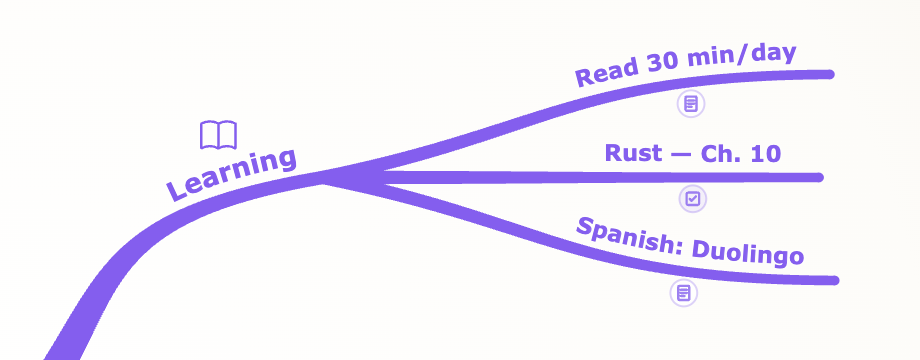
Tendril is a private desktop mind mapping app for planning, research, study, and writing. Shape loose ideas into organic maps, work offline, and export cleanly when you are ready to share.
Free macOS beta now · Windows planned later · No account required
Tendril keeps the essentials close: a fast canvas, flowing branches, task-aware topics, local files, and focused tools that stay out of your way.
Curved branches keep related ideas connected, so the map stays visual instead of becoming a rigid diagram. Notes and task indicators stay quiet until you need the detail.
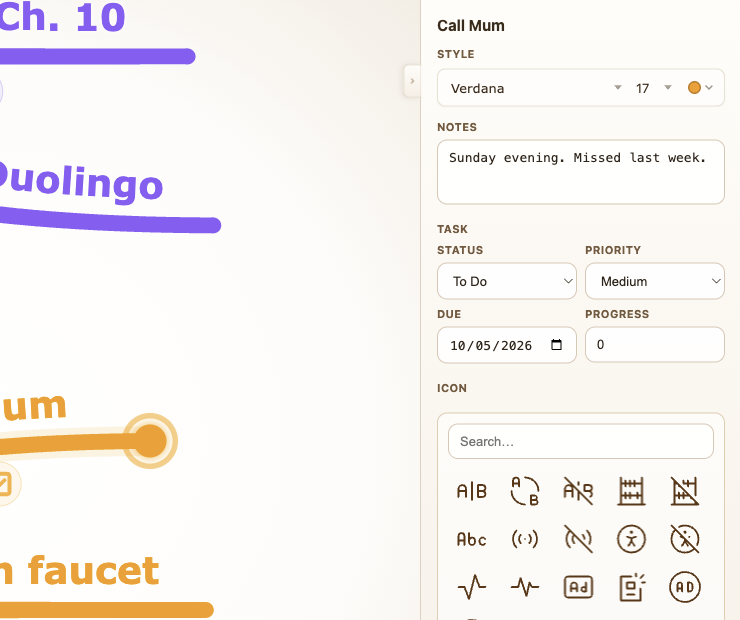
Select a branch to add notes, icons, status, priority, due date, and progress. The canvas stays readable while the practical detail remains one click away.
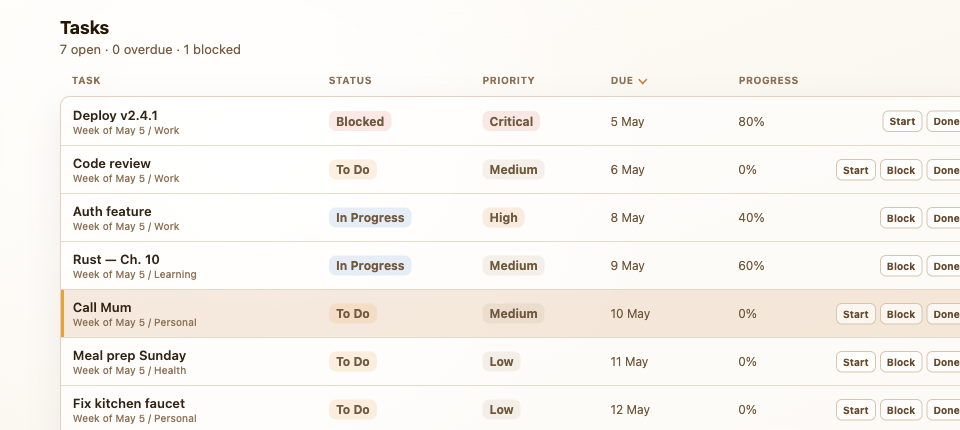
Branches with task details can roll into a sortable list. Scan due dates, update status, and jump back to the exact branch when you need context.
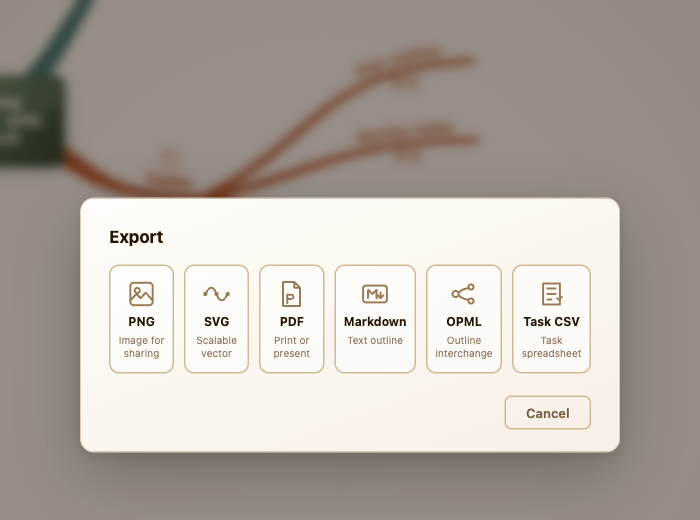
Export the same map as shareable images, documents, outlines, or task sheets for presentations, notes, and follow-up planning.
Use Tab for children, Enter for siblings, and drag to reparent. Build structure quickly without breaking your flow.
Use auto layout when a map gets uneven, collapse branches when you need focus, and rely on undo and redo while you explore.
Search finds labels, notes, and task details instantly. Step through matches without leaving the canvas.
Tendril needs no internet, no AI data sharing, no cloud workspace, and no account. Your maps stay as ordinary files on your own machine.
Recovery snapshots protect unsaved work after an unexpected close, and backup snapshots sit alongside successful saves.
Messy ideas are easier to shape when you can see how they connect.
Built for focused visual thinking
Tendril runs on Mac and Windows and saves maps as files you control. It keeps mind mapping focused, visual, and local without moving your thinking into a cloud workspace.
Tendril is for private plans, research trails, study maps, writing structures, and early ideas that are still taking shape. It is not trying to be a whiteboard suite, a meeting room, or another cloud account.
The big tools are better for collaboration, mobile ecosystems, templates, and enterprise workflows. Tendril is sharper when you want a quiet desktop app, files you control, and maps that feel organic instead of corporate.
| Alternative | Their strengths | Tendril's strengths |
|---|---|---|
| Xmind | Mature feature set, themes, AI options, collaboration, and broad import/export expectations. | Local files, no sign-in workflow, and a warmer organic branch style. |
| MindNode | Native Apple polish, iPhone/iPad support, iCloud sync, and years of refinement. | Local files, no sign-in workflow, and a simpler desktop purchase. |
| Miro | Team whiteboarding, workshops, integrations, templates, and enterprise collaboration. | Private desktop work, offline use, local files, and focused mind mapping without workspace overhead. |
| MindMeister | Cloud sharing, team accounts, browser access, task/project suites, and education/team plans. | No cloud dependency, no account requirement, direct file ownership, and simpler personal pricing. |
| Free tools | No purchase required and often highly flexible for technical users. | More polished visual output, smoother desktop workflow, and a product direction built around expressive maps. |
Tendril is paid desktop software for Mac and Windows: a one-time personal license, 2 years of updates, and optional paid upgrades for future major releases.
Local desktop software, no subscription, no recurring cloud bill.
Tendril is built for people who want a private mind mapping app, a local-first Xmind alternative, or a quieter desktop tool for visual thinking on Mac and Windows.
Yes. Tendril works offline and saves maps as local files on your own machine, so you can keep planning without a cloud workspace.
No. Tendril is built around local files, not accounts, cloud workspaces, or sign-in flows.
Yes. Any branch can carry status, priority, due date, and progress, then appear in Task View and task sheet export.
Yes. Tendril is built for Mac and Windows desktop use.
Use the request button to join the free macOS beta list.
Tendril is paid desktop software with a one-time personal license, 2 years of updates, and optional paid upgrades for later major releases.
Yes. Tendril exports images, documents, outlines, and task sheets so maps can move into presentations, notes, documents, and spreadsheets.
Those tools are stronger for collaboration, mobile ecosystems, templates, and team workspaces. Tendril focuses on private desktop maps, local files, organic branches, and a no-account workflow.
Use Tendril for messy ideas, project outlines, and study notes. Save locally, work offline, and export cleanly when you are ready to share.
Free macOS beta now · Windows planned later · No account required